
 Español
 Português
Z-Series 4.8.1 Introduces RoIP+ and Adds New Operability
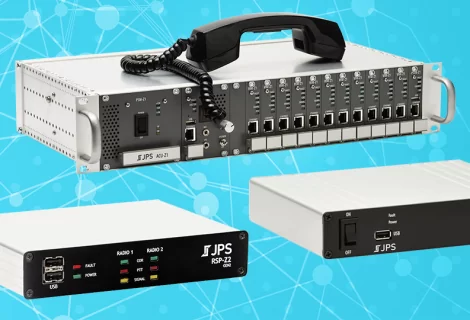
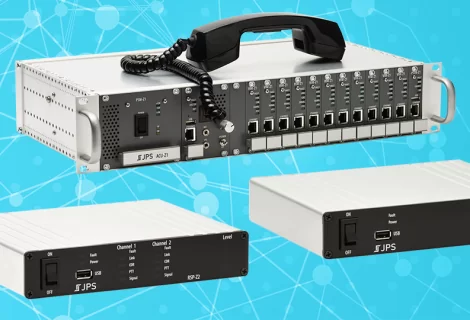
Z-Series 4.8.1 software for the RSP-Z2™, Z-Series Controller™, and ACU®-Z1™ adds Broadcast Groups, a new RoIP+® protocol & resource type, Operator Actions & Double-Click Shortcuts in the UI, and a new T-Mobile Direct Connect resource type.
Broadcast Groups
The Z-Series lets you get even more creative with your audio patches. In addition to two-way nets/patches, dispatch (on the Z-Series Controller and ACU-Z1), Browser Listeners, and Monitor Groups, the Z-Series now also supports Broadcast Groups.
Broadcast Groups are a one-to-many audio patch, like you might use to make an announcement. The Broadcaster can be any configured resource on the system, broadcasting to (speaking to) many other resources on the system.

Getting even more creative with these one-way resource groups, it’s possible to use Monitor Groups and Broadcast Groups to simulate cross mute.

RoIP+®
When JPS started patching communication systems some 35 years ago, connecting radios and PSTN phones was one of the more common needs. Fast forward to today, and the number of communication technologies – especially over networks – has expanded dramatically.
JPS RoIP+ is a new protocol and resource type specifically designed to facilitate modern communication needs.
- JPS RoIP+ has configurable, built-in encryption,
- Simplifies network and firewall traversal,
- Includes options for more than just audio, and
- Provides a long-term upgrade path for future communication.
RoIP+ distinguishes itself from JPS RoIP or JPS Bridge because it is more secure, more flexible, and has improved audio delivery through its use of TCP. Plus, it’s designed for the future inclusion of all kinds of additional information about the audio (such as a talker id) and other types of non-audio information.
Of immediate benefit to anyone using Z-Series devices, RoIP+ system-wide tunnels can significantly reduce and simplify your network port management. Traditional RoIP or Bridge connections require designating a port on both ends of each connection and configuring your firewalls and routers accordingly.

On the other hand, multiple new RoIP+ audio/metadata streams can pass through a single RoIP+ connection.

Streams are still kept separate, but when using RoIP+ you reduce firewall configuration by reducing the number of open ports. This, along with limiting access to the encryption information, increases your overall network security.
The capabilities of RoIP+ will only grow over time within the JPS Z-Series and as it is adopted by partners such as PoC apps, enabling the integration of even more powerful communication features.
T-Mobile Direct Connect
Joining the JPS array of Push-to-Talk over Cellular (PoC) application resource types on JPS Z-Series gateways is T-Mobile Direct Connect. We’re updating our WAVE PTX Guide to include T-Mobile Direct Connect.
Operator Actions
As part of a resource’s settings, you can now configure presets for DTMF injection, EIA Tones, and Call Initiation (on call-based resources). Once these are configured, an operator can easily access and execute them from the Home page.
Radio Resource AUX-I/O Functionality
The DB-15 analog radio connectors on the RSP-Z2 and the ACU-Z1 support two auxiliary signal inputs and two auxiliary signal outputs. When configured on a Radio resource, an operator can see the current auxiliary input states in a resource dialog and enable or disable the auxiliary outputs. This does require a radio cable that supports the auxiliary signals, which is not standard but can be added to most JPS cables.
Double-Click Shortcuts
Double click a resource and have it put into a net? Double click it to open its status dialog? Double click a resource to perform the first Operator Action? What about double clicking it to move it back out of a net? You choose. We’ve added these and a few other options in the Personal Preferences to speed up or simplify the things you do most often on the Home page.
Default Resource Groups Display Preference
Speaking of preferences, another new preference option on the Z-Series Controller is Local and Systems (Alphabetized) for displaying System and Distributed resource groups in the left panel. This came to us as a request from a customer with a Z-Series Controller and many RSP-Z2s, and it gives you another option alongside the Default and the Local and Systems options. Of course, your custom groups like Favorites and Personal or Global Groups still appear at the top of the Resources panel for easy access.
Learn More and Update Software
Visit support.jps.com to view/download updated Z-Series software documentation.
Download and install the 4.8.1 software/firmware for the RSP-Z2, Z-Series Controller, and the ACU-Z1