
 Español
 Português
Z-Series 4.7.0 Update Transforms ACU-Z1
Z-Series Software Update 4.7.0 Transforms ACU-Z1
Adds New Features to All Z-Series Products
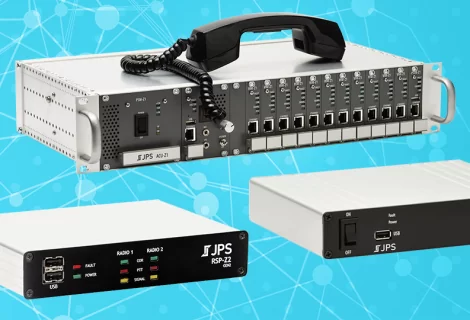
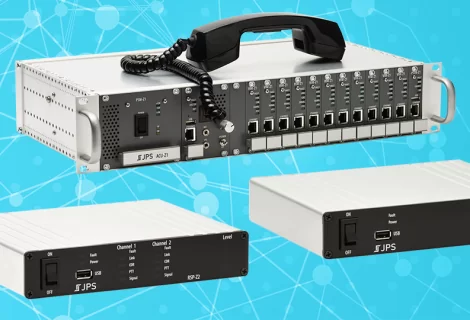
The release of Z-Series software update 4.7.0 transforms the ACU-Z1 and continues to provide new features for the RSP-Z2 and the Z-Series Controller.
- New Alert Management settings work with a third-party text message service to send alerts to inform you of potential communication problems.
- SIP enhancements provide, among other things, configurable outgoing call dialing options that may help with erratic networks or slow registrars.
- Zello connection resiliency is improved.
- Audio quality for Listener Resources in the web browser is smoother.
- Resets don’t always require a reboot, making them faster and easier.
- USB Headset resource has a new Push-and-Hold option.
- The Z-Series Controller has a new resource type: Composite Resources work like a static patch between two or more resources on the same system.
But the real story is the ACU-Z1
You may have noticed the RSP-Z2 and the Z-Series Controller have received several major updates in recent years, but the ACU-Z1 has not. That’s not because the ACU-Z1 wasn’t a priority – it was. However, the ACU-Z1’s modular hardware design adds complexities that our engineers needed to address thoughtfully. They did so by steadily building up the version 4 software. In other words, JPS engineers used the RSP-Z2 and Z-Series Controller releases since 4.0.0 to work progressively toward this ACU-Z1 upgrade, which is now ready for you to install. Going forward from 4.7.0, the ACU-Z1 will receive regular updates alongside the RSP-Z2 and Z-Series Controller.
4.7.0 Transforms the ACU-Z1
Honestly, the version 4.7.0 ACU-Z1 release notes go on for about 12 pages if you print them up, so let’s just hit a few highlights. You can read the full Release Notes for all Z-Series devices here.
- Each VIM-Z1 and PSTN-Z1 now has two resources instead of just one. The second is virtual (not radio or PSTN). The radio and PSTN resources may be hardware based or virtual (e.g., various PoC providers, SIP, etc.)
- Resources on the CPM-Z1 are easier to set up – no more Bridges table. The CPM-Z1 still has up to 24 resources, but they’re no longer limited to JPS Bridge or JPS RoIP. They can also be MCC Console, RTP, or SIP.
- Native ESChat and JPS VIA for simplified setup, encryption, and better presence detection.
- Audio in the Browser lets you use your web browser to listen to audio from resources in the system.
- Composite Resources let you create static patches or combinations/groups of multiple resources on a single system. (The CPM-Z1 is a system, each VIM-Z1 or PSTN-Z1 card is its own system.) Resources in a composite always send/receive audio with each other, and they may also be moved into and out of nets just like any other resource type. This replaces the less flexible passthrough resources previously offered.
- Significant improvements in stability and capabilities on every resource type, from Radio to PSTN to SIP to Push-to-Talk over Cellular (PoC), etc.
- Drastically improved user interface (UI), making it easier to use, more informative, and customizable.
- Broad system configuration improvements for performance, to reduce downtime, simplify backup/restore and reset, manage software updates, and automatically manage VIM-Z1 and PSTN-Z1 card settings like IP address.
- Network configuration control for adjustable web port, HTTPS support, NTP configuration, certificate management, port management, and card network management, among others.
- Advanced setup and configuration options, including card management, network troubleshooting tools, packet capture troubleshooting, audio verification test tone, net locking, patented Adaptive Transmit Delay to improve trunked radio connectivity, improved diagnostics, etc.
- Security improvements like hiding passwords, automatic upgrade from HC-128 to ChaCha20 encryption (with license), enable/disable SSH, login timeout, user lockout for repeated failed logins, and improved overall encryption behavior.
- Updated help built into the software: Product Tour, Field Setup Guide, Resource Guides with common troubleshooting, expanded and more easier-to-use context-sensitive help text, Release Notes in the Help menu, and even more at https://support.jps.com
Updating Your ACU-Z1 to Version 4
4.7.0 was the first update to ACU-Z1 software since 3.1.6, and as of March 3, 2025 there is a new version (4.7.1). If you still need to update from version 3 to version 4, you may update from version 3 to version 4.7.1. (You do not need to update to 4.7.0 prior to migrating from version 3 to 4.7.1. You’ll just use the migration package from version 3 to version 4.7.1.) Since this is a significant improvement, the initial update is a little more complicated than it will be for future updates. That said, we’ve managed to automate a good portion of the migration process for you.
Here’s some advice from a few of our “beta” users.
- When you download the migration package from the JPS support page, be sure to follow the migration package instructions.
- During the migration, you’ll want to be on-site with your ACU-Z1, which will be unavailable for service during the process.
- When a resource’s type changes, it is removed from nets, so you will want time to rebuild or verify your nets and resources. (Note: Most resources and nets will remain in place.)
- If you’ve been using ESChat or JPS VIA, those resources will still look the same, but they’ll be JPS RoIP resources. If you want to apply those credentials to native ESChat or JPS VIA resources, you’ll want to work with your ESChat admin to do so (see JPS Ancillary Guides for the ESChat Guide with instructions on how to do this – it’s the same as for the RSP-Z2).
- Once you migrate from version 3 to version 4, you can’t go back – but you definitely won’t want to either.
We at JPS are thankful for our customers and we are proud to be able to provide you with the highest quality interoperability products, solutions, and services. Providing you with customer support for free is just one way we can show our respect and appreciation for what you do. Feel free to contact us any time during migration; we’re here for you.
You’ll find software/firmware updates and installation instructions for your Z-Series system at https://support.jps.com